

Range Filter
Overview
The Range Filter allows you to filter the collection by using an HTML range field.
Ideal for
This filter is especially useful for entries that contain numeric values, such as those in an integer field.
Options
You can set the min, max and step values as well as a default value that sets the default value of the range slider.
Default value caveat
If there is a preset condition specified in the livewire-collection tag, it will override the default value set using the filter's default property.
Syntax
{{ livewire:lf-range-filter
    blueprint="cars.car"
    field="seats"
    condition="gte"
    min="2"
    max="9"
    default="2"
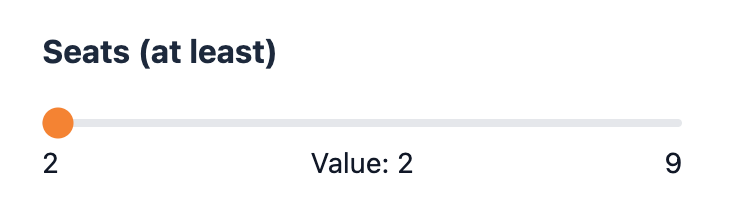
}}
Dynamic bounds
With enable_dynamic_range_bounds turned on in the config file, the slider narrows to the lowest and highest values among the entries that still match the other active filters, instead of always spanning min to max. It's off by default.
'enable_dynamic_range_bounds' => true,The bounds are calculated the same way as for the Dual Range Filter, including the rounding to step, the extra step for gt and lt, and the fallback to min and max. See How the bounds are calculated, and Performance for the cost of the extra queries.
On the Range Filter:
- Before the filter is used, the handle follows the bounds: it moves to the
defaultvalue (ormin), kept within the new range. This doesn't apply a filter. - Once the user moves the handle, changing the other filters never moves it. If the matching entries no longer reach the selected value, the bounds widen to include it.
- Moving the handle back to the default, or to where the default sits within the narrowed range, clears the filter, as long as that position doesn't exclude any matching entries.
- When every matching entry has the same value, the bounds collapse to that value and the slider is disabled until the other filters leave room again. A slider with an active selection is never disabled: if it has no room to move, it shows the full
min–maxinstead.
Custom views
The lf-range.blade.php view changed in v4.6.0. If you published it before that, re-publish it or merge in the changes below, otherwise the slider won't follow the bounds. The input takes its min and max from $dynamicMin and $dynamicMax (falling back to $min and $max), $boundsDisabled disables it, and a listener for the range-bounds-updated event keeps the displayed value in sync. This is the full default view:
<div>
    <div
        class="grid grid-cols-1 gap-y-4"
        x-data="{
            init() {
                // Only the display syncs; the true selection is preserved server-side.
                // Bounds go first so the value isn't clamped to the old range.
                $wire.on('range-bounds-updated', (bounds) => {
                    $refs.range.min = bounds.min;
                    $refs.range.max = bounds.max;
                    $refs.range.value = bounds.selected;
                    $refs.selectedValue.textContent = bounds.selected;
                });
            }
        }"
    >
        <div class="relative mb-3">
            <input
                id="{{ $field }}"
                type="range"
                x-ref="range"
                min="{{ $dynamicMin ?? $min }}"
                max="{{ $dynamicMax ?? $max }}"
                step="{{ $step }}"
                class="w-full h-1 mb-6 bg-gray-200 rounded-lf appearance-none cursor-pointer"
                wire:model.live="selected"
                @disabled($boundsDisabled)
            >
            <span class="text-sm text-lf-text absolute start-0 -bottom-1">{{ $dynamicMin ?? $min }}</span>
            <span class="text-sm text-lf-text absolute left-1/2 -translate-x-1/2 -bottom-1">{{ __('statamic-livewire-filters::ui.value') }}: <span x-ref="selectedValue">{{ $selected }}</span></span>
            <span class="text-sm text-lf-text absolute end-0 -bottom-1">{{ $dynamicMax ?? $max }}</span>
        </div>
    </div>
</div>
The event's payload has min, max, selected and disabled. See Custom views on the Dual Range Filter page for details.
Range list
Since v4.7.0, the Radio and Select filters can offer a list of number ranges, such as "Under 100", "100 to 200" and "Over 200", instead of a slider. Add a buckets parameter. No condition is needed:
{{ livewire:lf-radio-filter
    blueprint="cars.car"
    field="price"
    buckets="0-12000|12000-16000|16000-20000|20000-"
}}
The Radio Filter shows each bucket as a radio option, plus an All option that clears the selection. The Select Filter takes buckets too, in both its lf-select and lf-select-advanced views. Its empty option (All or your placeholder), or the clear icon in lf-select-advanced, clears the selection.
{{ livewire:lf-select-filter
    blueprint="cars.car"
    field="price"
    buckets="0-12000|12000-16000|16000-20000|20000-"
    placeholder="Any price"
}}
Ideal for
Number fields, such as an integer price. Visitors pick one bucket at a time. Buckets take numbers only, so use the Dual Range Filter for dates.
Buckets and labels
Separate buckets with |. Each bucket is min-max. Leave a side empty for an open range, such as 20000- or -12000. The labels are generated: 0-100 and -100 read "Under 100", 100-200 reads "100 to 200" and 200- reads "Over 200". Change the wording with the range_under, range_between and range_over keys of the language file.
To write a label yourself, for example to add a currency, pass options keyed by bucket. A bucket you leave out keeps its generated label:
{{ price_labels = [
    '0-12000' => 'Up to €12,000',
    '12000-16000' => '€12,000 to €16,000',
    '16000-20000' => '€16,000 to €20,000',
    '20000-' => '€20,000 and up'
] }}

{{ livewire:lf-radio-filter
    blueprint="cars.car"
    field="price"
    buckets="0-12000|12000-16000|16000-20000|20000-"
    :options="price_labels"
}}
A bucket filters the field like the Dual Range Filter, with gte and lte, so the URL and the tags show price:gte and price:lte. An open side sets only one of them. Both ends are inclusive, so a price of exactly 12000 matches two of the buckets above. Set modifier="gte|lt" so a bucket stops just below its max. The modifier takes gt or gte, then lt or lte.
A malformed bucket, or one whose min is above its max, throws an InvalidRangeListBucketException. Any other modifier throws an InvalidRangeListModifierException.
Counts
With enable_filter_values_count turned on, each bucket shows how many entries it matches. zero_count works on buckets like on any other option. The selected bucket and the All option always stay.
Bounds that match no bucket
A bucket is selected when the bounds in the URL, or a preset on the livewire-collection tag, match it exactly. Other bounds still filter the entries, for example from an old link made before you changed buckets. Then:
- Radio Filter: no option is checked. Choosing All clears the bounds.
- Select Filter: it shows "Custom range". Its empty option, or the clear icon in
lf-select-advanced, clears the bounds. Change the label with therange_customkey of the language file.
Choosing a bucket replaces the bounds in both filters.
Range list views
The Radio Filter uses the lf-range-list.blade.php view and the Select Filter keeps its own views. Pass view to use your own. While the bounds match no bucket, $selected holds 'custom' (LfRadioFilter::UNMATCHED_RANGE). Check your All option only when $selected is empty, as the bundled view does, or it can't clear such bounds. The select views get the "Custom range" label from $this->unmatched_range_option.
If you published lf-select or lf-select-advanced before v4.7.0, merge in the new markup or re-publish them. Without it, the plain select shows its empty option for such bounds and can't clear them.
